Fully certified by CARB since Nov 2022
Silver Snap-Tool
With over 1.4 MILLION tests processed –
Leader in OBD testing for the CA Clean Truck Check program
Stay CARB-compliant with
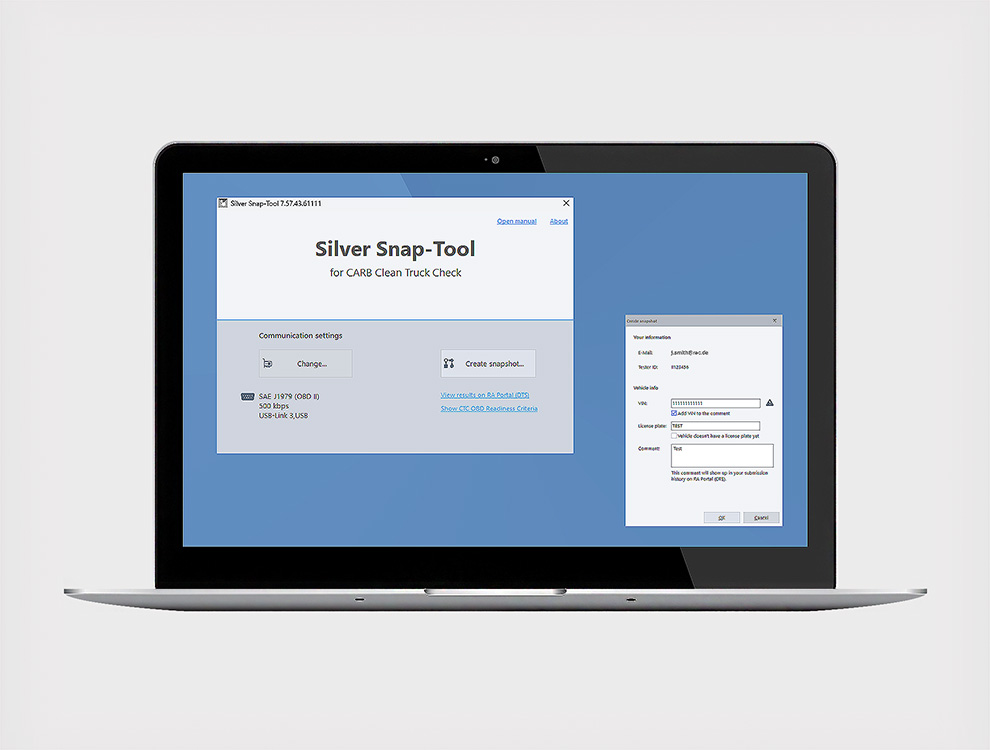
The proven Silver Snap-Tool solution meets all the requirements of the California Clean Truck Check (CTC) program. This user-friendly tool supports truck owners and fleet managers in collecting and automatically transmitting the required OBD data to the California Air Resources Board (CARB). Silver Snap-Tool was the first officially CARB-certified software and has been supported by RA Automotive Software Solutions.
The Silver Snap-Tool Pre-Check Viewer and Silver Snap-Tool Portal help customers manage the entire Clean Truck Check process efficiently. From checking readiness criteria to monitoring test results, RA offers the complete tool chain for a convenient CTC organization. With a single email address and password, you can easily access Silver Snap Tool software, Silver Snap-Tool Portal, and the Pre-Check Viewer.
 https://silversnaptool.com/wp-content/uploads/2026/09/Headerbanner_600x400_Trucking-Show.jpg
400
600
Anke Werner
https://silversnaptool.com/wp-content/uploads/2023/07/RACSS-Logo-300x138.png
Anke Werner2026-09-10 08:59:442026-09-10 10:53:41CA Trucking Show 2026
https://silversnaptool.com/wp-content/uploads/2026/09/Headerbanner_600x400_Trucking-Show.jpg
400
600
Anke Werner
https://silversnaptool.com/wp-content/uploads/2023/07/RACSS-Logo-300x138.png
Anke Werner2026-09-10 08:59:442026-09-10 10:53:41CA Trucking Show 2026 https://silversnaptool.com/wp-content/uploads/2026/08/Pre-Check-Viewer_Readiness-Criteria.png
468
636
Anke Werner
https://silversnaptool.com/wp-content/uploads/2023/07/RACSS-Logo-300x138.png
Anke Werner2026-08-26 10:19:272026-09-10 10:55:26Testing Tips: Pre-Check Viewer
https://silversnaptool.com/wp-content/uploads/2026/08/Pre-Check-Viewer_Readiness-Criteria.png
468
636
Anke Werner
https://silversnaptool.com/wp-content/uploads/2023/07/RACSS-Logo-300x138.png
Anke Werner2026-08-26 10:19:272026-09-10 10:55:26Testing Tips: Pre-Check Viewer https://silversnaptool.com/wp-content/uploads/2026/07/SSNT_headerbanner-J1979-2.jpg
1314
1920
Anke Werner
https://silversnaptool.com/wp-content/uploads/2023/07/RACSS-Logo-300x138.png
Anke Werner2026-07-15 07:26:232026-09-10 10:52:15Silver Snap-Tool – Newsletter July 2026
https://silversnaptool.com/wp-content/uploads/2026/07/SSNT_headerbanner-J1979-2.jpg
1314
1920
Anke Werner
https://silversnaptool.com/wp-content/uploads/2023/07/RACSS-Logo-300x138.png
Anke Werner2026-07-15 07:26:232026-09-10 10:52:15Silver Snap-Tool – Newsletter July 2026 https://silversnaptool.com/wp-content/uploads/2026/06/Kreis_Update-now.png
624
625
Anke Werner
https://silversnaptool.com/wp-content/uploads/2023/07/RACSS-Logo-300x138.png
Anke Werner2026-06-15 09:30:552026-06-24 09:59:54Mandatory software update
https://silversnaptool.com/wp-content/uploads/2026/06/Kreis_Update-now.png
624
625
Anke Werner
https://silversnaptool.com/wp-content/uploads/2023/07/RACSS-Logo-300x138.png
Anke Werner2026-06-15 09:30:552026-06-24 09:59:54Mandatory software updateCTC tests
Silver Snap-Tool Users
Clean Truck Check
The Silver Snap-Tool was the first CARB-approved software for reading OBD data from heavy-duty vehicles in accordance with the California Clean Truck Check program.
The recorded data is packaged, encrypted, and transmitted to a CARB server. Silver Snap-Tool users will receive a PASS or FAIL result from CARB within a few minutes. At the sophisticated Silver Snap-Tool Portal, CARB test results can be monitored 24/7.
Silver Snap-Tool is currently available as a Windows software application.
Anyone who wishes to collect and submit OBD data for compliance with the CA Clean Truck Check program must successfully complete a free online training session from CARB, pass the accompanying exam and receive a Tester ID to become an approved tester.
Our RA Automotive Software Solutions team is pleased to support you!

More information:
Computer System
To run Silver Snap-Tool you need a standard laptop with
The software can be installed alongside other programs. Dedicated laptop not necessary.
Approved VCI Hardware

To ensure fast installation and reliable operation of your software, we can supply you with all the equipment from a single source. Vehicle Communication Interface (VCI) devices can be ordered directly from RA Automotive Software Solutions. Additionally, you benefit from our dedicated US-based customer support.
Microsoft and Windows are trademarks of the Microsoft group of companies.
More
PRE-CHECK VIEWER
California Clean Truck Check
This unique software is designed to test trucks in a matter of minutes. With our highly reliable and monitored servers we have your data secure and ready to be analyzed, even if CARB experiences downtime.
The software is easy to install and operate for all tech skill levels. Our “Get Ready” section, tutorial videos and the Portal User Guide can assist you step-by-step. For extra convenience, you can choose between a dark or light screen mode.
View all your test results on the Silver Snap-Tool Portal coming at no additional cost. Export data to Excel for reporting and utilize search fields to find specific results. Managers: View results for your shop, or region, or company.
Check prior to running your Silver Snap-Tool if your data can fulfill the latest readiness criteria from CARB. No additional cost for Silver Snap-Tool users.
Our US based team offers comprehensive support. You can contact us via email, phone, or the support form below. Every day we strive to exceed our customers´ expectations reflected in exceptional satisfaction reviews.
Silver Snap-Tool was the first CARB-certified solution that covers all areas of the CTC program. It enables vehicle and fleet owners to effortlessly test vehicles and transmit data to CARB for fast analysis.
Silver Snap-Tool is backed by RA Consulting. The company provides excellence in automotive diagnostic software for more than 35 years. Silver Snap-Tool is based on the reliable and proven OBD product Silver Scan-Tool.
Silver Snap-Tool Online Installer (EXE)
Silver Snap-Tool Installation Guide (PDF)
Silver Snap-Tool Manual (PDF)
End User License Agreement (PDF)
Terms of Service Silver Snap-Tool (PDF)
Refund Policy (PDF)
Agreement: RA Automotive Software Solutions, Inc. and the manufacturer of the software, RA Consulting GmbH in Germany, are only responsible for the production and delivery of the software. The supplied software Silver Snap-Tool captures OBD data from vehicles and transmits it to a server operated at CARB. The use of the software is the sole responsibility of the user. Attempting to manipulate the captured data in any way is the sole responsibility of the user and is subject to California law.
How to check if my truck meets CARB´s readiness criteria using the Pre-Check Viewer tool?
Our Pre-Check Viewer tool provides parameters to show the vehicle readiness status like warm-up cycles (WUC), distance traveled in km, engine running time in minutes since the codes were cleared, and the number of active permanent diagnostic fault codes. Based on these parameters, the user can decide whether the truck meets the CARB readiness criteria and whether it makes sense to perform the OBD test.
Every Silver Snap-Tool user can use the Pre-Check Viewer at no additional cost.
If you want to install the tool, please contact: sales@ra-automotive.net
Additional information you can find here: https://ww2.arb.ca.gov/obd-readiness-criteria
What is the minimal equipment I need to do CA Clean Truck Check testing?
Also, a set like this is never bound to a single person but can be used by several users/testers – for example, if they work on different shifts and do not need it simultaneously.
On how many computers can I run a license of Silver Snap-Tool?
You can only register a license on one computer at a time.
However you can move the license to another computer, for example if you buy a new one.
See “How do I transfer a license to another/new computer/laptop?” in such a case.
Do I need to pay annual subscription fee for each tester sharing one laptop?
No, you can have an unlimited number of users (testers) sharing the same laptop. The software license and annual data transfer service is registered to the laptop, not the user/tester.
If you only have one laptop, you only pay one annual fee regardless of the number of users.
How many users can I have per license?
There is no limit at all, except that all users need to share the computer that Silver Snap-Tool is installed to.
In this case, we recommend that each user sets up their own Windows account on the computer instead of sharing a single Windows account.
If I have several licenses, are DTS user accounts bound to a specific license?
No, any user can use any license. User accounts are not bound to specific licenses or distribution numbers.
Which interfaces have been approved for use with the Silver Snap-Tool?
Here you can see the list of approved interfaces by CARB:
• Kvaser Leaf Light HS v2 OBD II
• Kvaser Leaf Light HS v2 J1939-13 Type II
• Kvaser U100 including adapter cables to OBD II / J1939 Type II
• Kvaser Leaf v3
• DG Technologies DPA XL including adapter cable to OBD II / J1939 Type II
• Drew Technologies DrewLinQ including adapter cable to OBD II / J1939 Type II
• NEXIQ Technologies® USB-Link™ 2
• NEXIQ Technologies® USB-Link™ 3
Can I use a device that I already own?
Of course. If you already own one of the approved interface devices you can use it. In this case you only need the software, which is Silver Snap-Tool plus a data transfer service (DTS) subscription.
Can I use a device that is not listed/approved?
No. Silver Snap-Tool will only allow you to use interface devices that are approved by CARB. Please find the list of devices here.
Why do I receive the test result "Pass*"?
What is the Readiness Criteria and how to get the truck READY?
The diagnostic trouble codes have been cleared recently and not all readiness monitors are set to ready state again. CARB has prepared an own website with information about Operation Since codes Cleared (OSC) and how to reach a status to get a Pass result without a *. In the future, Pass* results will no longer be possible; this will lead to a Fail result instead. Read more on OBD Readiness Criteria | California Air Resources Board
I didn’t get the email with the license key.
Check your junk folder. Also, consider using the Online method like recommended in our video. With this method you don’t need the email for finishing the registration.
How do I transfer a license to another/new computer/laptop?
Just contact office@ra-automotive.net with subject “Silver Snap-Tool hardware change” in such a case and – if you own several licenses – provide the distribution number of the one you want to move. You will be provided with further instructions then.
Silver Snap-Tool Portal
Thank you for sharing them with us!


